
A Privacy Event notifies the configured recipients when a user and/or admin enters or exits Privacy Mode. Configure the Privacy Event to receive email and/or SMS notifications.
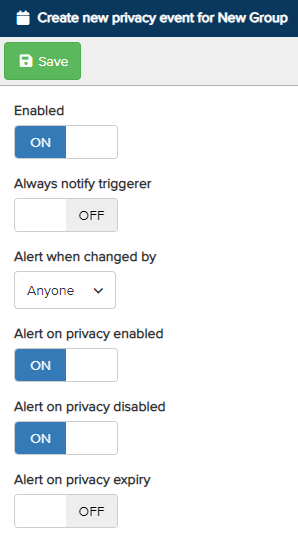
-
Enabled – Turn the switch On to enable Privacy Event notifications for the configured recipients.
-
Always Notify Triggerer – Sends a notification to the user who triggers a Privacy Event.
-
Alert When Changed By – Receive a notification when Privacy Mode is changed by Anyone, The Device, or The Admin. Click the drop-down to select your preferred option.
-
Alert on Privacy Enabled – Receive a notification when a user enables Privacy Mode.
-
Alert on Privacy Disabled – Receive a notification when a user disables Privacy Mode.
-
Alert on Privacy Expiry – Receive a notification when a user’s timed Privacy expires.
Once configured, click Save at the top. Next, define the recipients who will receive the event notifications.