
A Point of Interest (POI) provides real-time information about specific locations, which can be vital in assessing a user’s safety. Examples include train stations or airports. From the main configuration page, select the ‘POI Layers’ button to access these functions. This will open the POI editor page.
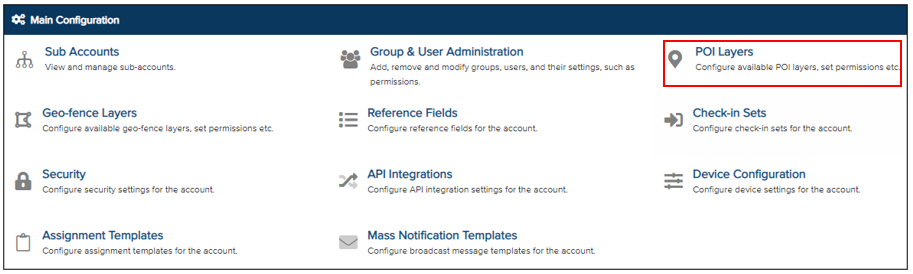
Click ‘New’ to create a POI layer.

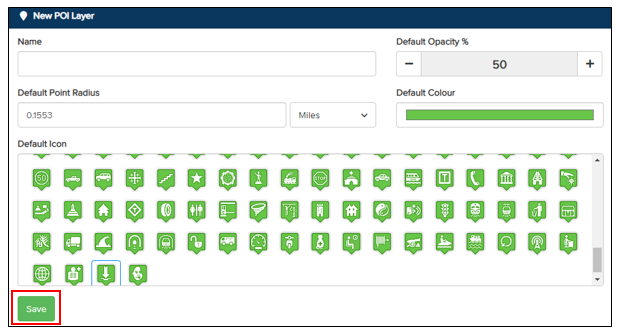
Enter the required details to customise your POI layer. Choose a name, set a colour, and select an icon for the POI layer. Click ‘Save’ to complete the configuration.
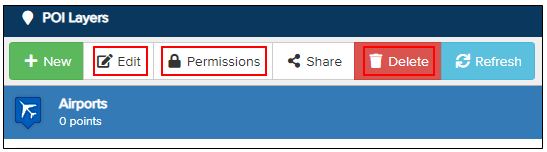
To edit a POI layer, click on it until it is highlighted in blue, then select ‘Edit’ to reopen the POI layer editor page. To delete a POI layer, select ‘Delete’. To assign permissions for specific groups to view or edit the POI, select ‘Permissions’.
A new page will open. Click ‘New’ to add a group permission. Then click the magnifying glass and select a group from the list. The selected group will then be granted the rights to use that POI.

Groups must be assigned permissions to either View or Edit a POI.
- View – Allows the group to view the POI.
- Edit – Allows users within the group to view and edit the POI.
Click the down arrow under ‘Permissions’ to assign either the View or Edit permission. To remove a permission entirely, click the bin icon. Remember to click ‘Save’ on the top bar of the screen to confirm your changes.