
A Red Flag Event notifies specific group members (Recipients) when a user triggers a Red Alert on their device. Configure the Red Flag Event to receive notifications via Email, SMS, and/or Voice Call when a user raises a Red Flag Alert.
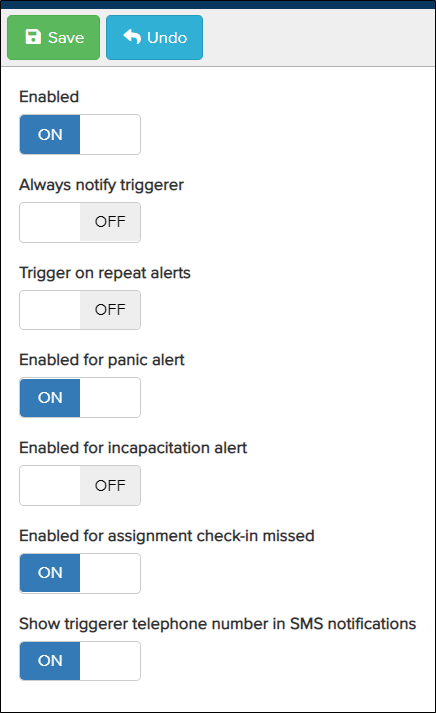
- Enabled – Turn the switch On to enable Red Flag Event notifications for the configured recipients.
- Always Notify Triggerer – Sends a notification to the user who triggers a Red Flag Event.
- Trigger on Repeat Alerts – This feature is deactivated as it provides no benefit.
- Enabled for Panic Alert – Raises a Red Flag notification when a user presses the Red Button. Use this option if you want a Red Alert raised only when someone misses an Assignment check-in, rather than when the Red Alert button is pressed.
- Enabled for Man Down – This feature is not currently active.
- Enabled for Assignment Check-in Missed – Raises a Red Flag when a user misses an Assignment check-in.
- Show Triggerer Telephone Number in SMS Notifications – Displays the phone number associated with the account of the user who pressed the Red Alert in the SMS notification.
Once configured, click Save at the top. Next, define the recipients who will receive the event notifications.